How Autopilot works
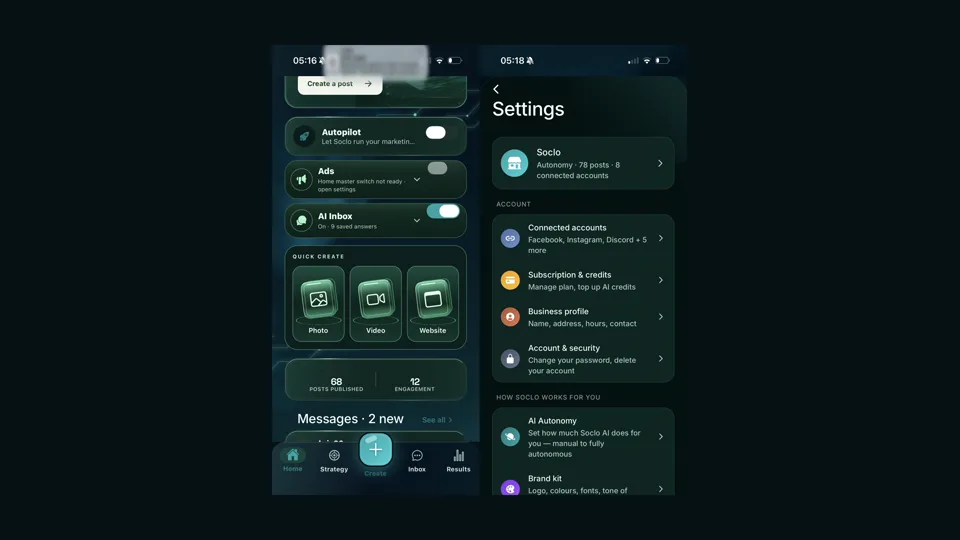
Autopilot plans, makes, schedules and posts on a rhythm you choose. You decide two things before anything else: whether it asks you first or does it for you, and how much it may ever spend. It cannot switch itself on, and it cannot raise its own ceiling. This guide is organised around those limits, because the limits are what make it reasonable to switch on at all.
Where do I switch it on?
On the Home tab there is an Autopilot card with a master switch, and under it a line telling you exactly what state you are in. Off reads Off — Soclo drafts nothing and spends nothing. Paused reads Paused — a temporary hold. Your settings are kept. The full set of controls is behind All Autopilot settings.
It cannot turn itself on. Saving a goal, tapping a setting or sending Soclo AI a message will not do it. Switching it on is a deliberate act, and the confirmation shows what it will cost.
Approve first, or do it for me?
This is the decision that changes everything else, and there are two of them — one for posting, one for money.
| Control | Settings | What it decides |
|---|---|---|
| How posts go out | Approve first / Post for me | Whether finished work waits for your tap or goes out on its own. |
| How ad money is spent | Approve first / Spend for me | Whether Soclo asks before using your ad budget. |
Start on Approve first for both. It is one tap to loosen later, and the first fortnight of seeing what it would have posted is worth more than the time it saves.
On Approve first for ad money, the app is honest about the edge case rather than hiding it: new ad actions need your approval, but campaigns that are already live may carry on spending until you pause them.
Or split it by what kind of thing it is
If all-or-nothing is too blunt, open Before it posts and set each kind separately, each with Show me or Just post:
- Caption on my own photo — your picture; only the words are Soclo's.
- A photo Soclo made — an image nobody has looked at yet.
- A video Soclo made — the one most people want to watch first.
- Anything off-brand — when Soclo is not sure it sounds like you.
The sensible middle setting for most people is letting captions on your own photos go, and seeing everything else. The box tells you where you are at a glance: posts everything, shows you everything, or shows you 2 of 4.
What happens when I do not like an idea?
On the Strategy tab, anything waiting on you is under Needs your decision, with Approve and Reject on each item.
Reject does not delete the slot. It asks you to confirm, and the prompt says exactly what will happen: Soclo will plan something else for this slot. The buttons are Keep it and Reject, and there is an optional box to say why.
Say why when you can. It is the fastest way to stop the same wrong idea coming back next week, and it is more useful than rejecting the same thing three times.
A post that failed to go out gets different buttons: Try again, or Drop it. And for something already published, Remove only takes it off this list — the app tells you plainly that a post that already went live stays live on the platform, and you delete it there.
Can I stop it posting to one account?
Yes. Every connected account has its own posting switch on the Connected accounts screen. Turn one off and Soclo will not post there on its own, while everything else carries on.
That is the tool for the account you want to keep personal, or the platform you are not sure about yet. There is a separate setting for whether Autopilot may use accounts you connect later — leave it off unless you want it, so connecting a new platform in six months does not quietly widen what Autopilot touches.
The sentence that matters most
That is the app's own description of your spending ceilings, and it is the whole safety model in one line. Every limit you set is a limit Autopilot operates under. It cannot decide the ceiling was too low and adjust it. If it needs more, the only thing it can do is ask you.
Which means the worst case is bounded by numbers you chose, rather than by how well the software behaves.
It works to a plan you agreed
Autopilot does not invent a direction. You build a plan with Soclo AI — starting from your goal, in conversation — and that plan is saved as text you can read. Not a hidden model of you: an agreed statement you can open, check and disagree with.
You can clear it at any point, and the app is clear about what that means: Soclo goes back to planning from your goal alone. So the plan is revocable, and reverting is a defined state rather than an unknown one.
Being able to read the instruction that software is acting on is unusual, and it is the thing to make use of. If Autopilot is producing work you do not like, the plan text is the first place to look.
The controls, and what each one actually decides
Spending limits
- A daily credit cap. Stops the day's spend at your limit and resets at midnight. This is the one that prevents a bad day becoming an expensive month.
- Always ask above. Any single action costing more than an amount you set needs your tap. Useful even when you trust the daily cap, because it catches the one expensive thing rather than the many cheap ones.
- An ad spend ceiling, in pounds, if you let it spend on advertising at all — with a separate limit on the most it can put behind any one post.
Advertising is its own switch: Let Soclo spend on ads, which is either On — it can launch ads on its own, inside your ceiling or Off — every ad waits for your yes, showing the £ first. Leaving it off means Autopilot handles content and never money, which is a sensible place for most businesses to stay. Running ads, and Ads Watch covers the rest of it.
What Soclo makes
How much, and to what standard — how many pictures a week, and a quality setting where, as the app puts it, better looks sharper and costs more credits. That trade-off is stated rather than hidden, which lets you spend deliberately.
How often it tells you
Weekly gives you one Sunday summary instead of a nudge per post. For most people running a business this is the right setting — a per-post notification stream is how people end up ignoring the app entirely.
Which accounts
Including whether it may use accounts you connect later. Leave that off unless you want it, so connecting a new platform in six months does not silently widen what Autopilot touches.
Running and paused are both visible states
The app says plainly whether Soclo is running or paused, and pausing stops everything: nothing runs until you switch it back on. That is a real stop, not a slowdown, and it does not require unwinding your settings first — you can pause for a week and resume with everything as it was.
Use it. Pause during a holiday, during a complaint, during anything happening publicly that scheduled cheerfulness would land badly against.
A cautious order for switching it on
- Fill in the Brand Kit first. Autopilot writes from it. Switching on before that is the single most common way to get output that sounds like nobody. The Brand Kit guide covers it.
- Set the ceilings before anything else, lower than you think. They are easy to raise and impossible for Soclo to raise.
- Set both modes to Approve first. Everything waits for you, posts and money alike.
- Leave ad spending off. Content first; money later, if at all.
- Turn off the posting switch on any account you want kept personal, before the first plan runs rather than after.
- Agree a plan, and read it back. If the plan text does not describe what you are actually doing, fix that now rather than judging the output later.
- Run it for a fortnight on approval-only. Approve, edit or reject each item, and notice which you reject and why.
- Then loosen one thing. Usually letting the routine posts go out unattended while anything unusual still waits.
Every step is reversible in a tap, which is why it is worth being conservative at the start rather than cautious forever.
What it is not for
- Replying to customers. That is the inbox, and it has its own much stricter rules — see automatic replies, where complaints, money, promises and requests for a person always come to you.
- Deciding your prices or offers. Those come from your Brand Kit and are yours.
- Anything time-critical. A launch, an event, a correction — do those yourself.
- Replacing judgement about your own business. It handles the routine so the non-routine gets your attention, which is the whole argument for it.
What to check in the first month
Once a week, four things: what it posted, what you rejected and whether a pattern is forming, what it cost in credits against your cap, and whether the plan text still matches what you want. Ten minutes.
If you are rejecting most of what it produces, the fault is almost always upstream — the Brand Kit or the agreed plan — rather than in the individual posts.
Where to go next
What Soclo will never do without asking covers the boundaries that hold whatever your settings. Using Soclo AI covers turning Autopilot on from the chat and approving its drafts there. Running ads, and Ads Watch covers the money side. How credits work explains what Autopilot is spending, and reading your Results covers judging whether any of it worked.
Common questions
What is the difference between approve first and do it for me?
It is one control with two settings. On Approve first, everything waits for you before it goes out. On Post for me, routine work goes out on its own. There is a matching pair for ad money: Approve first or Spend for me. You can change either at any time.
What does Reject actually do?
It asks you to confirm, and tells you the consequence in one line: Soclo will plan something else for this slot. So rejecting is not deleting a slot, it is asking for a different idea in it. You can add a reason if you want, and it is optional.
Can I stop Autopilot posting to one particular account?
Yes. Every connected account has its own posting switch on the Connected accounts screen. Turning one off stops Soclo posting there on its own while leaving the rest running.
Can Autopilot switch itself on?
No. Saving a goal, changing a setting or sending a message cannot turn it on. Switching it on is a deliberate act with a confirmation that shows what it will cost.
Can Soclo raise its own spending limit?
No. The wording in the app is explicit: Soclo can never raise this — it can only ask. Every ceiling you set is a ceiling it operates under, not a starting suggestion it can adjust.
Will it post things I have not seen?
Only if you set it that way. There is a separate control for what happens before it posts, so you can require your approval on everything, and you can change that at any time without unwinding the rest of the setup.
How do I stop it?
One switch pauses everything. The app states the consequence plainly — nothing runs until you switch it back on — so a pause is a genuine stop rather than a slowdown.
What stops it spending my credits in a day?
A daily credit cap that stops the day’s spend at your limit and resets at midnight, plus a separate rule that any single action costing more than an amount you choose needs your tap first.
Does it decide what to post on its own?
It works to a plan you agreed. You build that plan with Soclo AI, and it is saved as text you can read and clear. Clearing it sends Soclo back to planning from your stated goal alone.
Will it use accounts I connect later?
Only if you tell it to. That is its own setting, so connecting a new platform does not silently widen what Autopilot may touch.
How often will it interrupt me?
You choose. Weekly gives you one Sunday summary rather than a nudge per post.
Still stuck? Tell us the screen or address, what you expected and what happened. Never send a password, verification code or full card details.
Email Soclo support →